
Clinical-grade Excel QC
without macros or rework
Run SOP-aligned edit checks, anomaly trending, and PV-ready exports
inside the workbook teams already trust. Formulas and formatting stay intact.
Clinical data · Pharmacovigilance · CMC analytics · Launch excellence
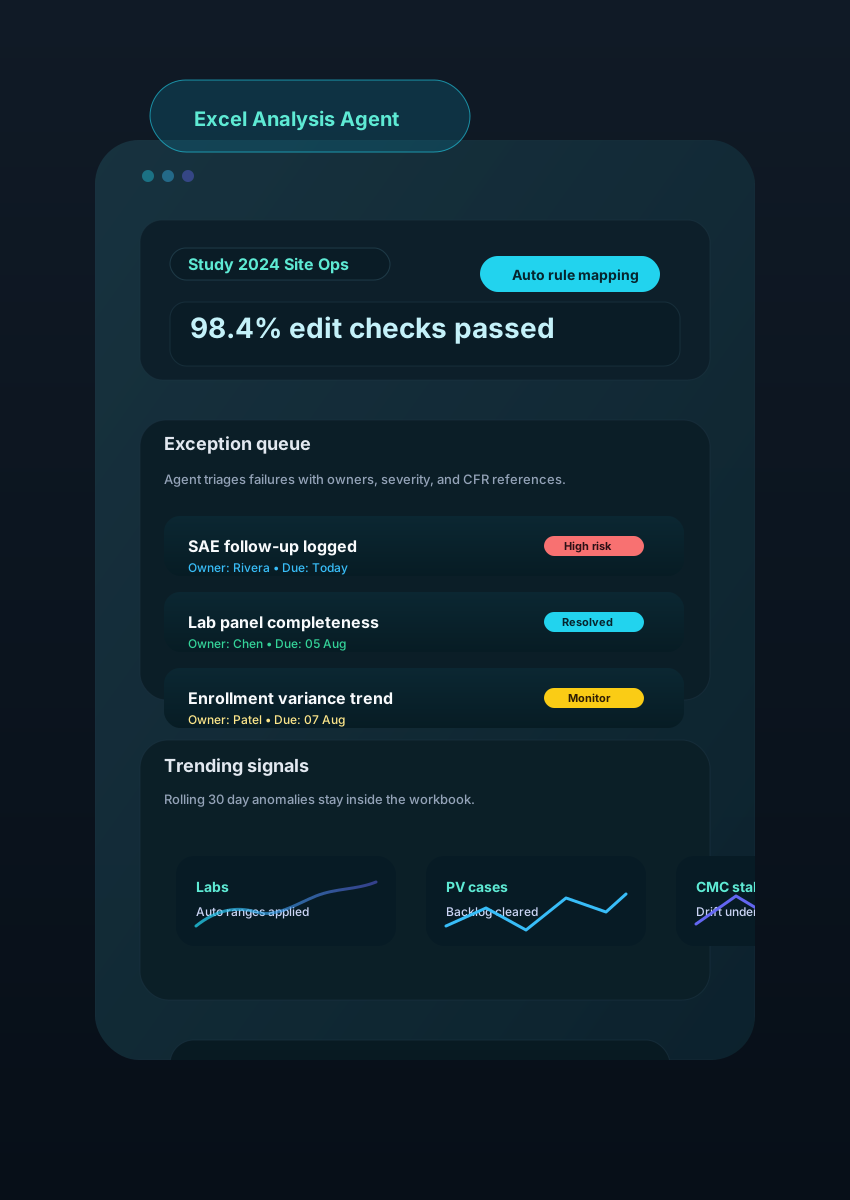
Excel Agent in Action
See how pharmacovigilance, clinical operations, and CMC teams keep everything inside one workbook while the agent does the heavy lifting.
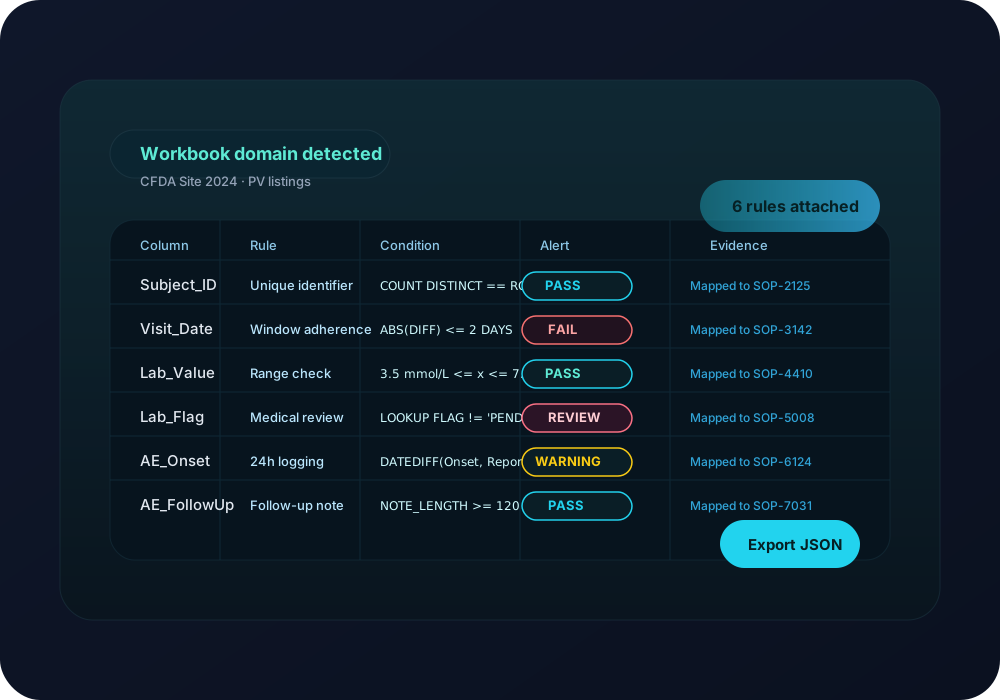
1. Import study workbooks and map SOP checks instantly
Upload raw listings, PV trackers, or CMC ledgers. The agent detects domains, units, and metadata, then applies the edit-check libraries you approve.
Auto-detects visit schedules, lab panels, and adverse event columns
Maps each check to SOP IDs and CFR citations for audit trails
Surfaces broken formulas and hidden sheets before reviews start
Built for every team that lives in spreadsheets
Clinical, safety, CMC, and commercial teams get tailored prompts, checks, and exports—while staying inside Excel.
Clinical data management
Objective
Run overnight edit checks and reconciliation on visit, adverse event, and lab listings without macros.
How Excel Agent helps
Excel Agent maps your study schema, executes SOP-linked checks, and posts exceptions with severity, owner, and CFR references directly beside the cells.
Pharmacovigilance signal tracking
Objective
Trend case counts, narrative backlog, and MedDRA code drift across global PV trackers in real time.
How Excel Agent helps
The agent combines multi-sheet metrics, flags emerging spikes, and pipes investigator follow-ups into a single review pane for safety leads.
CMC & manufacturing analytics
Objective
Validate release testing results, inventory movements, and stability pulls across batch ledgers.
How Excel Agent helps
Detects out-of-spec values, references master specs, and prepares CAPA-ready evidence packs that link results back to raw data tabs.
Site budgeting & finance
Objective
Control site spends and payment schedules while keeping sponsor and CRO models in sync.
How Excel Agent helps
Normalises inputs from multiple templates, flags variances, and exports executive summaries so finance can approve faster.
Medical affairs launch tracking
Objective
Monitor content readiness, field feedback, and approval cycles in the months leading to launch.
How Excel Agent helps
Highlights overdue claims, syncs status with reviewer comments, and produces weekly readiness dashboards from the same workbook.
Quality & audit preparation
Objective
Collect objective evidence and maintain Part 11 logs for inspections without duplicating spreadsheets.
How Excel Agent helps
Keeps validated copies, records change history, and generates inspection binders with hyperlinks to every resolved exception.
Excel automation aligned to pharma-grade controls
Swap VBA and manual QC with an agent that understands clinical data models, PV trackers, and manufacturing ledgers.
Rule libraries tied to your SOP IDs
Configure visit windows, lab ranges, SAE reconciliation, and custom tolerances once. The agent maps every check back to SOP and CFR references for audit readiness.
Works with complex study workbooks
Understands multi-tab listings, derived columns, pivots, and hidden sheets so it never breaks formulas or naming conventions.
Trending built in
Surface enrollment drift, lab excursions, or stability deviations with rolling thresholds and explainable anomaly scores.
Actionable review panes
Assign owners, capture rationales, and mark exceptions resolved without leaving Excel—status syncs back to your tracker.
21 CFR Part 11 friendly logs
Every action lands in an immutable log with user, timestamp, and rule ID so QA can evidence control without manual screenshots.
Enterprise security options
Deploy in your VPC, connect to validated data sources, and enforce SSO + least privilege across study teams.
How Excel Agent runs your QC in three passes
Keep analysts in Excel. The agent orchestrates checks, trending, and exports while respecting the workbook you already validated.
1. Connect & classify
Drop in a workbook or point to SharePoint/S3. The agent inspects tabs, ranges, units, and hidden sheets, then attaches the right SOP rule pack automatically.
2. Run checks & triage
Execute edit checks, anomaly scores, and cross-tab reconciliations. Findings surface in a review pane with owners, severity, and linked CFR/SOP references.
3. Export & archive
Freeze a Part 11 audit trail, tag resolutions, and push investigator packs or PV summaries to your document control system on approval.
Pricing Plans
Choose the plan that fits your needs. Start for free and scale as you grow.
Free
For individuals and small projects getting started.
$0
/ user / month
- Up to 10 file uploads
- Multi-file analysis
- WebSearch Integration
- FileSystem Integration
- Background & Chat Ops
- Self-hosted Cloud Deployment
- Customer Support
MOST POPULAR
Pro
For teams collaborating on content-heavy projects with advanced workflows.
$5
/ user / month
- Unlimited file uploads
- Multi-file analysis
- WebSearch Integration
- FileSystem Integration
- Background & Chat Ops
- Self-hosted Cloud Deployment
- Email Support
Enterprise
For large organizations with custom needs and security requirements.
Ask
- Unlimited file uploads
- Multi-file analysis
- WebSearch Integration
- FileSystem Integration
- Background & Chat Ops
- Self-hosted Cloud Deployment
- Dedicated Support & SLA
Ready to modernise your Excel QC stack?
Start a free trial and watch the agent run SOP checks, trending, and audit-ready exports on your real study or PV workbooks.